 EraseAILabel
Home / AI content label on Instagram
What Is the AI Content Label on Instagram, and Can You Remove It?
People report seeing "AI content," "AI info," or an AI tag on Instagram posts. Whichever words you see, a label on a live post is set by Instagram, so it depends on who added it.
Published by Km Anjali · Last reviewed November 2026
AI content, AI info, or an AI tag?
Meta's published material uses "AI info." We've also seen reports of the words "AI content," and our guide to the label notes that we couldn't confirm that wording from Meta. People also say "AI tag" when they mean the same thing. Labels and their wording can differ between app versions and regions, so treat these as one family of labels until the details in your app say otherwise.
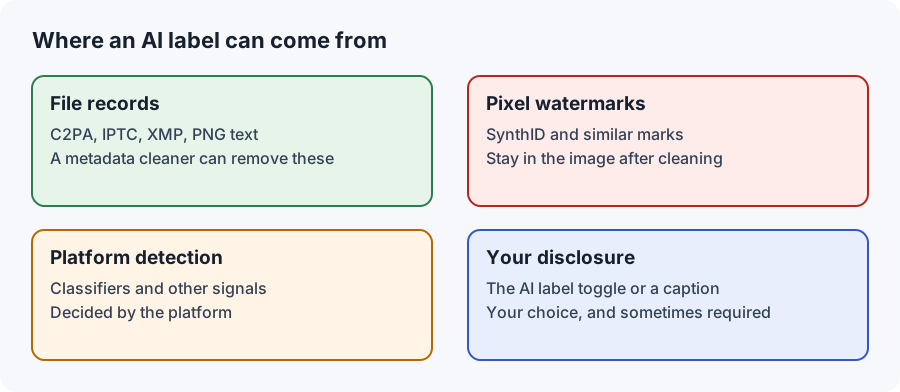
Tap the label or open the post's menu. Instagram may tell you more about why it's there, including whether it came from signals in the file or from the person who posted.
Can you remove it from a post that's already up?
- You added it: edit the post and look for the Add AI label toggle. Instagram's help pages cover how the label is added.
- Instagram added it: we found no official setting or appeal process for this. Check the label's details and the Help Center, as options may change.
- It's correct: leave it. A sentence in your caption can add useful context.
Removing the "AI content" tag from your next post
If the label is wrong, the most useful thing to do is find out why it appeared, so that it doesn't happen again.
- Scan the file you posted using the AI metadata checker. It runs on your device and names records such as Content Credentials and AI source tags.
- Trace the record back. Think about which app last saved the file. Some editors add a record even for a small generative edit.
- Go back to your original, and redo the edit with a non-generative tool if you can.
- Check the new export before uploading it.
Metadata cleaning has a place in this, for example when a real photo picked up a record it shouldn't have. The Instagram metadata page explains what it can and can't change. It doesn't remove pixel watermarks, and it can't guarantee what Instagram will do with your next upload.
When the label is right
If a generative tool created the picture or changed something that matters, the label is telling your audience something true. Meta says it keeps this type of content up with a label, unless it breaks other rules, so the label itself isn't a penalty. Trying to hide it is the riskier choice. It can damage trust if your audience finds out, and our Terms of Use don't allow it.
What to write in your caption
A label can feel like an accusation when you've done a lot of real work. A short caption lets you explain, in your own words:
- "Shot on my phone. AI used only to remove a sign in the background."
- "Illustration made with AI, then painted over by hand."
- "AI-generated concept image, not a real location."
If you're seeing AI content in your feed
Some people searching this phrase don't have a labeled post at all. They just want less AI in their feed. Marking posts as Not interested and hiding accounts that post mostly AI images will influence what's recommended, though we know of no switch that filters out all of it.

An entrepreneur on the EraseAILabel team who writes about photo privacy and AI labels. How we test
Common questions
Is AI content different from AI info on Instagram?
We could not confirm a separate meaning from Meta. Treat the wording as part of the same labeling system, and open the label to see what Instagram says about it.
How do I remove the AI tag from an Instagram post?
If you added it, edit the post and check the Add AI label toggle. If Instagram added it, we found no official way to remove it from a live post.
Does the AI content label hurt my reach?
We could not find a Meta statement saying the post label reduces reach. Meta says content rated False or Altered by fact-checkers is shown lower, which is a separate process.
Find out why your post was labeled
See what your file records, on your own device.