 EraseAILabel
Home / Edits and AI labels
Which Photo Edits Can Trigger an AI Label?
Not all editing is equal. Tools that generate new pixels can leave a record in your file, while ordinary adjustments usually don't.
Published by Km Anjali · Last reviewed November 2026
The key difference
The question usually isn't how much you changed, but whether a tool created new image content with generative AI and recorded that fact. A single small fill can be enough for a tool to add its record.
Edits reported to cause labels
| Edit | Why it may matter |
|---|---|
| Generative Fill or Expand | Creates new pixels and can write Content Credentials |
| AI object removal in apps | Often generative, depending on the app |
| AI background replacement | May add generated content or a record |
| AI upscaling or restoration | Depends on the tool and its export settings |
| AI background removal | Reported in 2026 with Canva's tool, though it isn't generative |
Edits that usually don't add an AI record
- Crop, rotate, exposure, contrast, and color adjustments.
- Traditional retouching such as Clone Stamp and Healing, as users have reported in Adobe's community.
- Filters that don't use generative AI.
Software changes quickly, and a feature's name doesn't always tell you what it does. Your app's help pages and a scan of the exported file are the best guide.
Check your workflow
- Export one test image after each kind of edit.
- Scan each file with the Metadata checker.
- Note which steps add Content Credentials or XMP data.
Choosing the right tool
If you're fixing a dust spot, a traditional healing tool is often quicker, and it means no AI was used, so nothing needs declaring. If you did use generative AI in a meaningful way, a label is doing its job, and we suggest you leave it and explain the edit if it helps.
Removing a record doesn't change how an image was made. Read how to disclose AI content for guidance on being upfront.
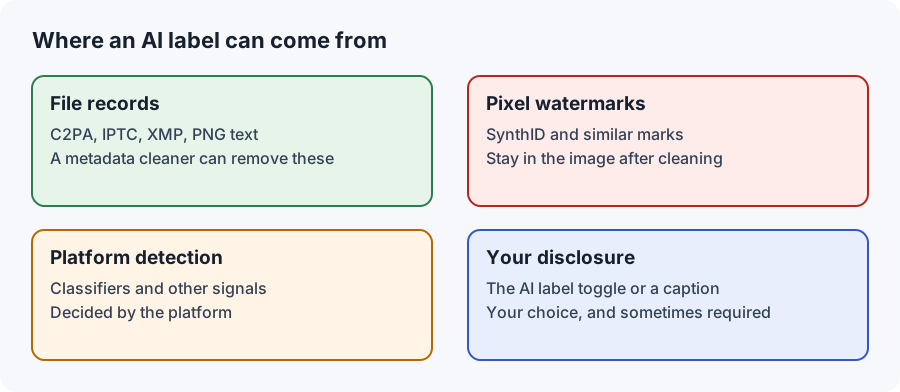
Where the record comes from
App by app: what to check
- Photoshop: Generative Fill and Generative Expand create new pixels. See our Photoshop and Lightroom page.
- Lightroom: Generative Remove is generative, and the export dialog has an option for Content Credentials. In a June 2024 test by PetaPixel, a photo edited with Generative Remove carried no C2PA record and wasn't labeled, but Adobe said Content Credentials would be attached once the feature became generally available. So results from 2024 may not match today: scan your own export.
- Canva: labels have been reported after using its background remover.
- Phone galleries: AI erasers and "magic" edits may be generative, depending on the phone.
- Upscalers: AI-based upscaling tools vary, and some record their use.
If you're not sure whether a feature is generative
Feature names don't always say. Look for words such as "generative," "AI," or "fill" in the app's help pages, and check whether the feature needs an internet connection, since many generative tools run on a server. Then export one test image and scan it. If a record appears, the feature added it.

An entrepreneur on the EraseAILabel team who writes about photo privacy and AI labels. How we test
Common questions
Does using Generative Fill always cause a label?
Not always. It depends on what the tool records, how you export, and how the platform reads the file, but it is one of the most commonly reported causes.
Do normal filters trigger an AI label?
Ordinary filters and adjustments generally do not add an AI record, though it depends on the app, so a scan of the exported file is the best way to check.
Does it matter how small the AI edit was?
It can. A tool may record that generative AI was used without showing how much of the image changed.
Does AI background removal cause an AI label?
It has been reported, for example with Canva, even though background removal is not always generative. Scan your export to see what it records.
How can I tell if an editing feature is generative?
Check the app's help pages for words like generative or fill, then export a test image and scan it with a metadata checker.
See what your file records
The checker reads it on your device. Nothing is uploaded.