 EraseAILabel
Home / Turn off AI info on Facebook
Can You Turn Off AI Info on Facebook?
It depends on who added the label. If you added it, you may be able to change it. If Meta applied it from signals in your file, we found no official way to switch it off.
Published by Km Anjali · Last reviewed November 2026
Start by working out who added it
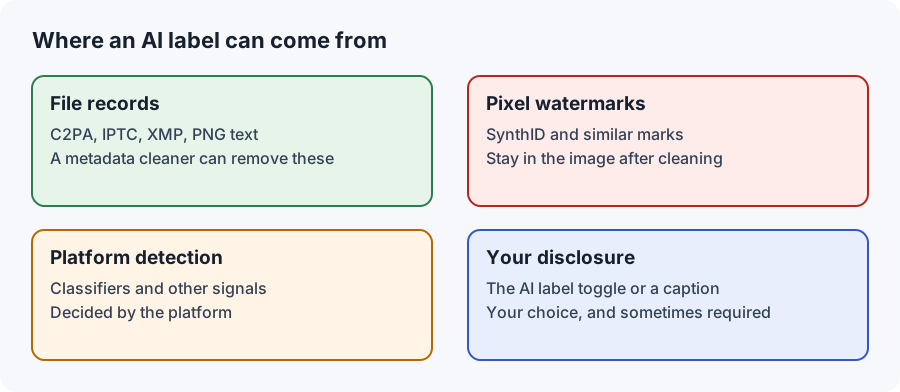
Meta describes two routes to the label: signals that it detects, and people disclosing AI use when they post. Your options depend on which one applies, so open the label or the post's menu and read what Facebook says. Then find your situation below.
| Situation | What you can do |
|---|---|
| You chose to add the label by mistake | Look in the post's edit options. If there's no option, delete the post and share it again without the disclosure |
| Meta applied it, and AI really was used | Leave it, and explain the edit in your caption if that helps |
| Meta applied it to a post with no AI | Find the cause in your file, send feedback, and add context in your caption |
| The post is realistic AI video or audio | Keep the label. Meta may require it and says there may be penalties without it |
Is there an official switch?
We read Meta's announcements and its Help Center page on AI labels. Neither describes a setting that turns off a label applied by Meta, and neither explains an appeal process. Some websites mention one, but we couldn't verify those claims. Check the label's own details and Facebook's Help Center, as options may change.
Several third-party guides say that editing a post's caption won't make Facebook re-check the image, because the status is set at upload. That fits what people report, though we couldn't confirm it from Meta.
If your real photo was labeled
Labels can be wrong, and photographers have objected to them since the feature launched. It's also true that a label can be technically correct about a photo that still feels real to you, so it's worth finding out which one you're dealing with.
- List every app the photo went through. Include phone gallery tools and any AI cleanup, sharpening, or background feature.
- Scan the exact file you uploaded. The AI metadata checker shows whether it holds Content Credentials or XMP data. It can't prove a photo is real, but it can point to the tool that wrote the record.
- Be honest about what you find. If a generative tool changed the picture, even slightly, the label may be accurate.
- Keep your original. An untouched camera file is the best evidence that you have.
- Add context in your caption. "Real photo, I used an AI tool to remove a power line" is clear and builds trust.
- Send feedback. Use the options on the post or in the Help Center, so Facebook knows about the error.
Should you delete and post it again?
Only when you're correcting something real. If you've gone back to an unedited original, or re-edited with a non-generative tool, a new post reflects what the photo actually is. A new post also starts from zero likes and comments, so on a post that's doing well, a clear caption is often the better trade.
What about removing metadata?
You'll see plenty of advice to strip a file's records before uploading. It's worth being clear about what that does. Removing metadata changes the file you upload next. It can't change a post that's already live, it doesn't remove pixel watermarks, and Meta can use other signals. It also doesn't change how a picture was made.
There are fair reasons to clean a file, such as keeping your location or editing history private, or re-exporting a photo that a tool wrongly marked. Hiding real AI use isn't one of them, and our Terms of Use don't allow it. Our Facebook metadata page explains what cleaning can and can't change.
Preventing a label on your next post
- For dust spots and small distractions, use a non-generative tool, so that no AI was used and nothing needs declaring. See which edits can trigger a label.
- Check your editor's export settings, and scan one test image after changing your workflow.
- Look through your phone's gallery settings for AI enhancements you may have left on.
If you manage a business Page
The same logic applies, with one addition: agree in advance who uses which tools. A label on a product photo often traces back to a retouching step that a freelancer or agency considered routine. Ask for the tools used on each image, keep the originals, and decide on one line of caption wording that you can use when AI really was involved.

An entrepreneur on the EraseAILabel team who writes about photo privacy and AI labels. How we test
Common questions
Is there a setting to turn off AI info on Facebook?
We could not find an official setting for a label that Meta applied from signals. Labels you added yourself may be changeable in the post options.
Can I appeal an AI info label on Facebook?
Meta pages we read do not describe an appeal process. Use the feedback options on the post or in the Help Center, and add context in your caption.
Will editing the caption remove AI info?
Third-party guides say it will not, because the status is set at upload. We could not confirm this from Meta, but it matches what people report.
Does the AI info label reduce my reach?
We could not find a Meta statement saying it does. Meta does say that content rated False or Altered by fact-checkers is shown lower in Feed, which is a separate process.
Find out what your file declares
Check it on your device before you post again.