 EraseAILabel
Home / Turn off AI info on Instagram
Can You Turn Off AI Info on Instagram?
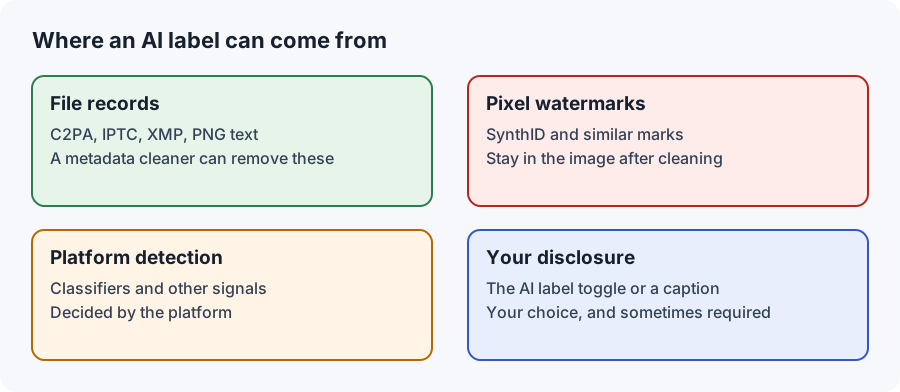
You can turn off a label you added yourself. Turning off that toggle doesn't stop an automatic label when your file carries AI records, and we found no official setting that does.
Published by Km Anjali · Last reviewed November 2026
Two different things share one name
Most confusion here comes from treating the label as a single switch. Instagram has an Add AI label toggle, which is your own disclosure. Separately, Meta may add the label when it detects industry-standard AI indicators. The toggle controls the first. As far as we can find, nothing in the app controls the second.
If you added the label
A review of the Instagram help pages describes the Add AI label toggle as appearing when you create a post or Reel. To change a post that's already up, edit it and look for the same option. Menus can differ between versions, and the Instagram Help Center will show the current steps. The feature is described as phone-only.
If Instagram added the label
We read Meta's announcements, and its help page on AI labels doesn't describe a setting or an appeal for labels that Meta applies. Sites claiming otherwise didn't show a source we could verify. Here's what you can do:
- Check that the label is really wrong. Did any app use generative AI on this photo, even for a tiny fix?
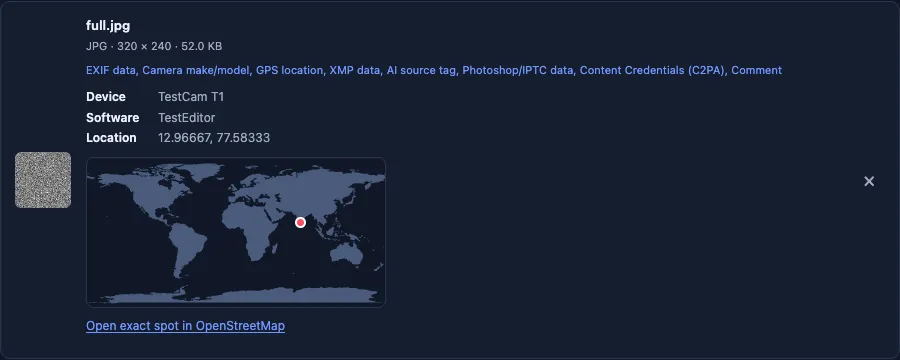
- Scan the file you posted with the AI metadata checker.
- Add context in your caption so that people know what was and wasn't done.
- Send feedback through the post's menu or the Help Center.
- Repost only if you're correcting something, such as going back to your unedited original.
Common myths
| Claim | What we found |
|---|---|
| Toggling the label on and off clears it | An older guide suggests this, and admits there's no guarantee. It only makes sense for a label you added |
| Editing your caption makes Instagram re-check the post | Third-party guides say it doesn't. We couldn't confirm this from Meta |
| The label means your post will be removed | Meta says it keeps this content up with a label, unless it breaks other rules |
| A label proves that your photo is fake | No. It can come from one small edit |
Stopping it on your next post
Choose non-generative tools for routine retouching, so that no AI was used and there's nothing to declare. Check your editor's export settings, and look through your phone's gallery for AI features you might have left on. Scan one test export whenever you change your workflow. See which edits can trigger a label.
If a file picked up an AI record that doesn't reflect what really happened, you can use the Instagram metadata tool on a copy. It's not a way to hide real AI use, and it can't guarantee what happens after you upload.
The same questions on other platforms
Facebook follows similar logic, as covered in our Facebook guide. TikTok is stricter, and says that an auto label can't be removed from a post. For the account-wide label, see the AI-generated profile guide.
Step by step: did you add the label?
- Open the post or Reel in the Instagram app on your phone.
- Tap the three-dot menu and choose Edit.
- Look for the AI label option. If it's switched on, switch it off and save.
- If there's no option, or it's already off, the label came from Meta's own detection.
Menus differ between app versions, so the wording may not match exactly. If you can't find it, the Instagram Help Center will have the current steps.
Reels and carousels
The toggle is described for posts and Reels alike, so the steps above apply to both. For carousels, we haven't confirmed how Instagram treats a post where only one image carries an AI record. Scan every image you plan to include, not just the first.
If the label keeps coming back
A label that appears on post after post usually points to a step in your workflow rather than a single photo. Work through these one at a time, exporting a test image after each change:
- Your phone's gallery: look for AI erase, enhance, or "magic" features, and anything that runs automatically.
- Your editor's export settings: some apps can add Content Credentials on export.
- Upscalers and filters: AI-based ones can record their use.
- Template and collage apps: these may use AI without saying so prominently.
Scan each test export with the AI metadata checker. When a record appears, you've found the step that adds it.
Creator and business accounts
The same rules apply to every account type. If you work with brands, agree in writing on how AI use will be disclosed, and keep the original files. A label that surprises a client is easier to explain when you can show exactly how an image was made.
What we'd do, in order
- Check whether you added the label, and switch it off if you did so by mistake.
- If Meta added it, decide honestly whether AI was used.
- If it was, keep the label and add context in your caption.
- If it wasn't, find the step that wrote the record, and fix your workflow.
- Only repost when you're correcting something real.

An entrepreneur on the EraseAILabel team who writes about photo privacy and AI labels. How we test
Common questions
Is there a setting to turn off AI info on Instagram?
You can switch off a label you added with the Add AI label toggle. We found no official setting for a label that Instagram applied from signals.
Why is the Add AI label toggle off but my post still has a label?
The toggle only controls your own disclosure. Meta can also add a label when it detects AI indicators.
Can I turn off AI info on a computer?
The controls are described as available in the phone app, so use the Instagram app on your phone.
Does turning off the AI label on a Reel work the same way?
Yes. The Add AI label toggle is described for posts and Reels alike. It only controls a label you added yourself.
Will Instagram penalize me for removing AI info?
We found no Meta statement about penalties for switching off your own label. Meta says penalties may apply when a required label is missing on photorealistic video or realistic-sounding audio.
See what your file declares
Check it on your device before posting again.